
OwnerRez + Localbird: Earn More Per Stay With Guest Experiences
How OwnerRez managers add a new revenue line with the Localbird concierge integration
If you run your rentals on OwnerRez, you already have one of the most flexible messaging setups in the industry. Templates, triggers, field codes: your guest communication runs on rails. What's usually missing is the part guests remember most, which is what they do once they arrive.
That's where Localbird comes in. Localbird is a digital concierge for vacation rentals. Your guests get a personal page of vetted local experiences and services, and they can book any of them in a few taps. You set it up once in OwnerRez, and it works for every stay after that.
This guide covers what your guests can book, why OwnerRez managers add Localbird, how the integration works, and how to set it up in two parts: connecting OwnerRez and setting up your guest messages.
About OwnerRez
Full control of your short-term rental without the full-time job. OwnerRez is internationally recognized as a leader in the vacation rental industry for channel management, CRM, PM, accounting, messaging, and websites. Integrate with all major vacation rental channels to seamlessly sync availability, rates, rules, and listing content. Get your own modern fast website, process payments directly, manage inquiries, communication, and guest checkout with e-sign renter agreements.
A #PeopleFirst Company
OwnerRez is a #PeopleFirst company that puts people over profits. We listen to customers' wants and needs, and we update OwnerRez appropriately. We are also one of the only independent PMS platforms/channel managers in the industry. AKA, we don't have any VC funding or outside investors telling us what we should do.
Built by Property Managers, for Property Managers
OwnerRez was built by property managers, for property managers. Many of our team members actively use it to manage their own vacation rentals, so we don’t just develop the software, we depend on it. Our personal businesses run on OwnerRez, proving its reliability and efficiency firsthand. We’re passionate about helping others get started and experiencing the difference it can make in streamlining and growing their businesses.
Ready to see it for yourself? Learn more about OwnerRez.
What Your Guests Can Book
We work with local vendors in each destination and only list the ones we'd send our own families to. A typical guest page includes:
- In-villa services: private chefs and grocery stocking
- Out and about: tours, ocean days, and gear rentals
- Wellness: massages, spa services, yoga
- Getting around: airport and local transportation
- Memories: photographers
Why OwnerRez Managers Add Localbird
A New Revenue Line
You earn a commission on every experience or service your guests book. No inventory, no invoicing.
Fewer "Any Recommendations?" Messages
Guests find answers on their page instead of in your inbox. Our team handles vendor coordination and booking support.
Stays Worth Reviewing
A great dinner or a morning on the water is often what guests write about. That shows up in your reviews.
No Setup Cost
Localbird is free for hosts. It runs inside OwnerRez messaging, so there's nothing new for your team to learn.
Key Insight: Your OwnerRez messages already reach every guest at the right moment. Localbird gives those messages something valuable to point to.
How the Integration Works
When you connect your OwnerRez account, Localbird reads only what it needs to personalize each guest's page:
- Property details: names, locations, and IDs, so recommendations match where the guest is staying.
- Reservation details: guest name, contact info, and check-in and check-out dates, so we only suggest what fits their stay.
- Booking events: new bookings and upcoming arrivals, so your messages go out at the right moment.
You stay in control of what is sent and when. Localbird posts your messages into each guest’s existing OwnerRez conversation, on the channel they booked through. You can edit the wording and timing, and you can disconnect anytime from OwnerRez under Settings > Advanced Tools > Connected Apps.
Set It Up in Two Parts
Part 1: Connect OwnerRez
1. Choose OwnerRez and Select Connect Your PMS
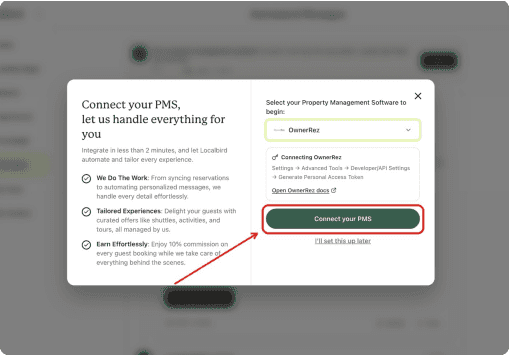
In the Localbird Host app, open PMS, select OwnerRez, and click Connect your PMS.
2. Sign In to OwnerRez
You are taken to OwnerRez. Log in with your OwnerRez email and password. If OwnerRez asks for a two-factor code, enter it to continue.
3. Authorize Localbird
Review the access request and click Authorize Localbird to let OwnerRez securely share your data.
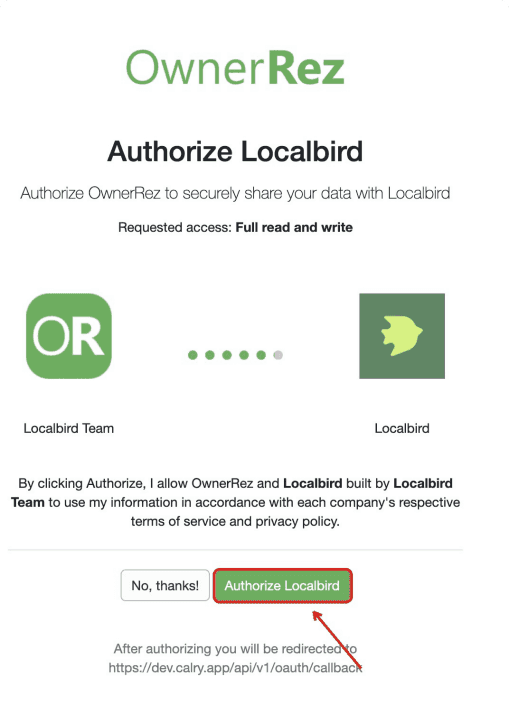
The OwnerRez authorization screen. Click Authorize Localbird to finish connecting.
Part 2: Set Up Your Guest Messages
As soon as you connect, Localbird takes you straight to your first page to set up guest messages.
4. Review Your Automated Messages
Localbird pre-fills a series of messages tied to the booking lifecycle: on booking, before check-in, at check-in, and after check-in. Review the wording and timing, and edit anything you like.
5. Link the Properties That Should Send These Messages
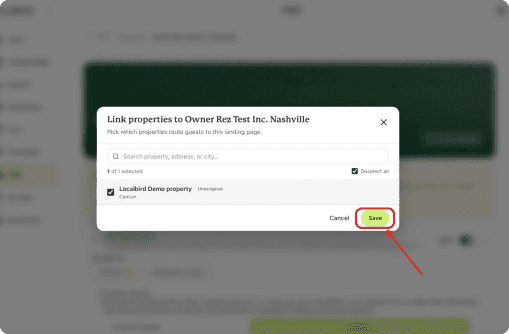
On the same page, choose which OwnerRez properties this set of messages applies to, then click Save.
6. Publish to Go Live
Click Publish. Localbird then sends the messages to guests on schedule.
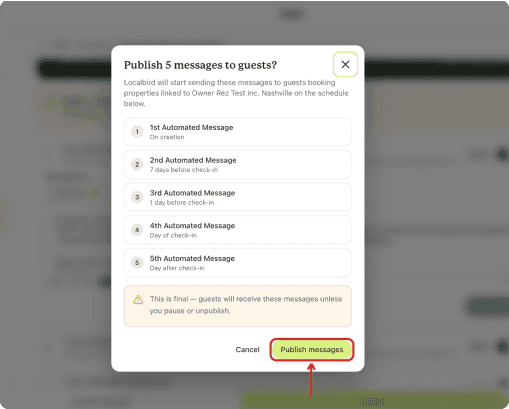
Pro Tip: Popular experiences book up, so earlier is better. Keep the on-booking message switched on so guests see their page soon after they book, not just at check-in.
When Your Messages Go Out
Localbird pre-fills a message for each stage of the booking:
- On booking: introduce the guest page while excitement is high.
- Before check-in: a reminder alongside arrival details, when plans firm up.
- At check-in: last-minute ideas for the stay.
- After check-in: a follow-up once the stay is underway.
Example Pre-Arrival Message
Hi {GuestFirstName}, we're looking forward to hosting you at {PropertyName}. To help you make the most of your stay, we've put together a page of local experiences we love: private chefs, boat trips, massages, and more. You can book anything right from your phone: [your Localbird guest page link]
This is an example of the tone. Localbird pre-fills your messages, and you can edit the wording and timing before you publish.
Frequently Asked Questions
What does it cost?
Nothing. There's no setup fee or subscription. You earn commission when guests book.
Who supports the guest if something changes?
We do. Localbird handles vendor coordination, changes, and guest questions about bookings.
Can I choose what's shown for each property?
Yes. Curate your guest page from the Partner Dashboard, and add or remove experiences any time.
Where do I track bookings and earnings?
In your Localbird Partner Dashboard.
Give Every OwnerRez Guest a Concierge
Connect your account in a few minutes. Your next guest could book their first experience this week.
Connect OwnerRez or read the OwnerRez support article.


